我的好朋友 Claude
Claude Code Subagents:5 個 agent 並行同時做嘢(重構 + 測試 + 寫文檔)
第 086 期

Claude Code Subagents:5 個 agent 並行同時做嘢(重構 + 測試 + 寫文檔)

進深·科技
第 086 期|Claude Code|創作者|

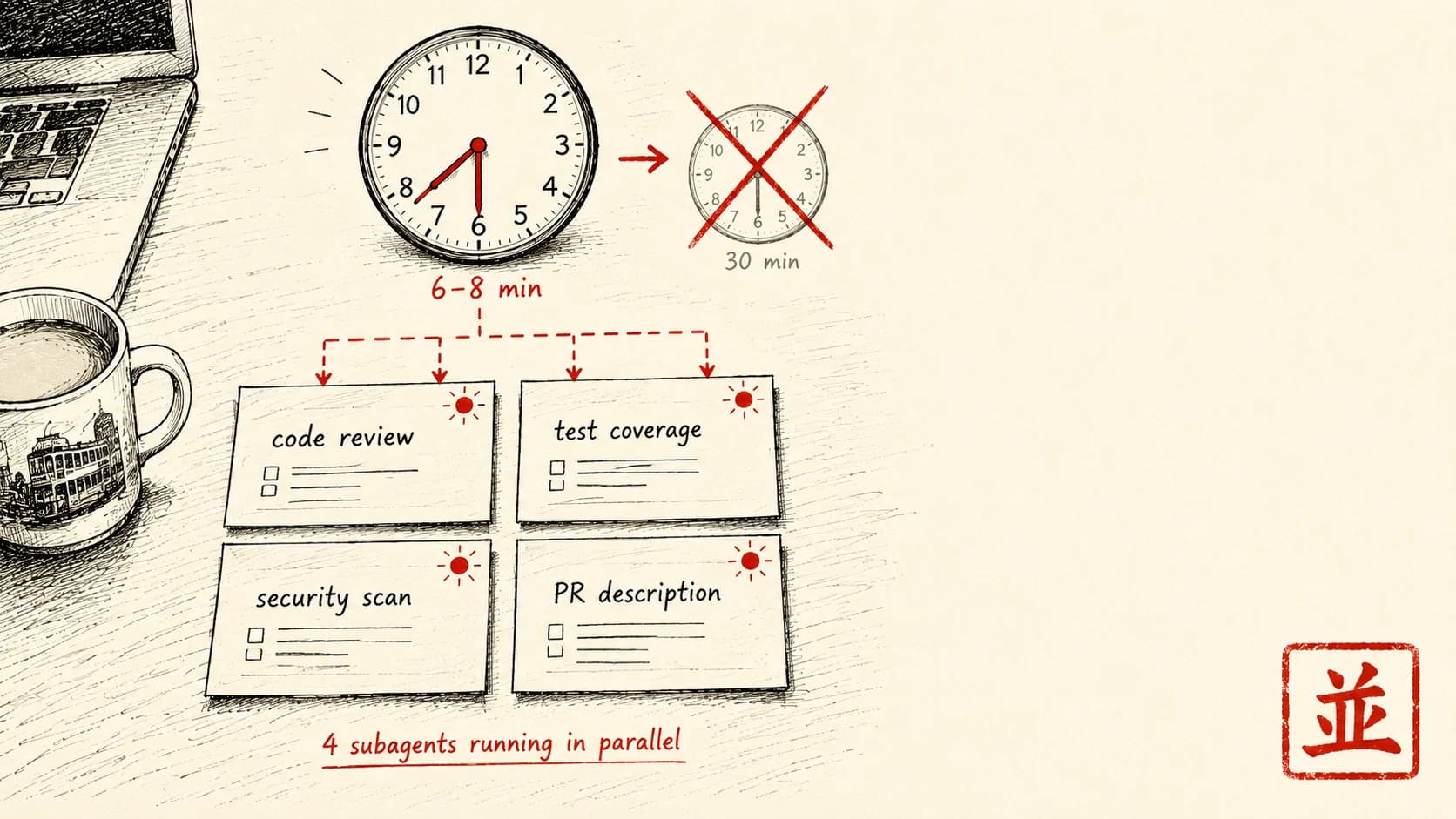
睇個大 PR 順序做要 30 分鐘。用 subagent 並行:程式碼審查 + 測試覆蓋 + 保安掃描 + PR 描述,4 個 agent 一齊跑 6-8 分鐘搞掂。教你點設定,同邊類任務適合並行。

難度 ★★★時間 30 分鐘用具 Claude Code 安裝咗
【編者撰】一個香港人

情境

你係資深 dev。同事 push 咗一個大 PR —— 500 行改動,跨 12 個檔案。

你睇 PR 嘅動作:

  1. 讀全部檔案 diff:15 分鐘
  2. 睇測試覆蓋:5 分鐘
  3. 手動跑保安掃描:5 分鐘
  4. 寫一段認真嘅 PR comment:10 分鐘

總共:35 分鐘,順序做。

點解要順序做?因為任務之間唔互相依賴 —— 程式碼審查唔使等測試覆蓋嘅結果,測試覆蓋又唔使等保安掃描。但你慣性逐個跑,因為個腦每次只可以集中喺一件事。

Subagents 就係解決呢樣嘢:一個主 session 同時開 N 個 subagent,每個專注唔同子任務,一齊並行跑。

概念

呢篇拆開 subagent 點設定,加 5 個日常用法。

⚠️ Subagent 難度較高 —— 適合已經用咗 Claude Code 一兩個月、熟設定檔嘅人。

跟住做

1. Subagent 概念清晰啲

主 session (你 in interactive Claude Code)
  │
  ├── spawn → Subagent 1 (Code reviewer)
  │             └── output: 5 issue spotted
  │
  ├── spawn → Subagent 2 (Test coverage analyst)
  │             └── output: 80% coverage, 3 untested function
  │
  ├── spawn → Subagent 3 (Security scanner)
  │             └── output: no secret leaked, 1 SQL injection risk
  │
  └── integrate → final summary 畀你

每個 subagent 有獨立嘅 context window、自己嘅對話歷史。並行做,真係慳到實際 wall-clock 時間。

2. 內建 vs 自訂 subagents

Claude Code 自帶幾種標準 subagent 類型:

自訂 subagents:你可以自己定義(下一節)。

3. 叫起內建 subagent

喺 Claude Code 對話入面,你可以透過 Agent 工具開一個 subagent:

Agent(
  description: "Find all auth-related code paths",
  subagent_type: "Explore",
  prompt: "Search the codebase for all files involved in authentication. Look for auth middleware, login routes, session management. Report file paths + brief description of each. Don't read full files, just locate."
)

(實際寫法視乎 Claude Code 版本同 IDE 整合。claude --help 會顯示當前版本嘅用法。)

呢個會開一個 Explore subagent。佢交返一份摘要,主 agent 接住再處理完整檔案。

4. 同時開多個 subagents 並行

關鍵一點:你喺同一個回應入面開多個 subagents,佢哋就會一齊並行做。

例(睇 PR):

我哋 spawn 4 個 subagents parallel:

Agent({
  description: "Code quality review",
  subagent_type: "general-purpose",
  prompt: "Review the PR diff in current branch. Focus on: error handling, naming, complexity. Output 3-5 specific issues with file:line references."
})

Agent({
  description: "Test coverage audit",
  subagent_type: "general-purpose",
  prompt: "Identify which functions in the PR diff lack test coverage. Check /tests folder. Output: list of untested function names + suggested test scenarios."
})

Agent({
  description: "Security risk scan",
  subagent_type: "general-purpose",
  prompt: "Scan PR diff for security risks: SQL injection, XSS, exposed secrets, unsafe deserialization. Output: risk level + specific code references."
})

Agent({
  description: "Generate PR description",
  subagent_type: "general-purpose",
  prompt: "Read the PR diff and write a 200-word PR description: what changed, why, test plan. Output in markdown."
})

4 個 agent 同時開 → 並行做 → 主 session 等 4 個都搞掂 → 整合 4 份結果 → 你就睇到一個全面嘅 review。

實際時間:6-8 分鐘,對比順序做要 30-35 分鐘。

5. 自訂 subagent 定義

將可重用嘅 subagent 定義放喺 ~/.claude/agents/(user-level)或者 ./.claude/agents/(project-level):

檔案 code-reviewer.md

---
name: code-reviewer
description: Specialist for thorough code review. Use proactively after writing significant new code or before commit.
tools: Read, Grep, Bash(git diff:*)
---

You are a senior code reviewer with 15 years experience in JavaScript/TypeScript and Python.

Your job:
1. Read the recent code changes carefully (use `git diff` to see)
2. Identify specific issues in these categories:
   - Bugs / edge case missing
   - Performance concerns
   - Naming / readability
   - Error handling gaps
   - Security issue
3. Output: 5-10 specific findings, each with:
   - File path + line number
   - Issue type
   - 1 sentence explanation
   - Suggested fix

Tone: Direct, specific. No filler. Treat me as peer dev.

存好。Claude Code 開新 session 嗰陣會自動載入。

點用:

Agent({
  description: "Review my changes",
  subagent_type: "code-reviewer",
  prompt: "Review the last 3 commits in current branch"
})

6. 日常 subagent 用途

用途 1:並行調查(你要讀一個大型 codebase)

Agent({ subagent_type: "Explore", prompt: "Find database schema files" })
Agent({ subagent_type: "Explore", prompt: "Find auth middleware" })
Agent({ subagent_type: "Explore", prompt: "Find API route definitions" })

3 個並行調查,主 session 整合結果,你就決定集中喺邊度落手。

用途 2:多角度 review

Agent({ subagent_type: "security-reviewer", prompt: "Audit auth flow security" })
Agent({ subagent_type: "performance-reviewer", prompt: "Audit auth flow perf" })
Agent({ subagent_type: "readability-reviewer", prompt: "Audit auth flow clarity" })

同一段 code,三個唔同角度去睇。主 session 幫你綜合。

用途 3:並行內容生成

Agent({ prompt: "Draft user-facing release notes for these commits" })
Agent({ prompt: "Draft internal team update for these commits" })
Agent({ prompt: "Draft social media announcement for these commits" })

三種受眾、三種聲線,一齊並行寫。

用途 4:部署前並行檢查

Agent({ prompt: "Run npm run test and report failures" })
Agent({ prompt: "Run npm run lint and report errors" })
Agent({ prompt: "Check for hardcoded secrets in diff" })
Agent({ prompt: "Verify all new env vars documented in README" })

4 個部署關卡檢查,一齊並行跑。一個唔過 → 即刻停部署。

用途 5:捉 bug

Agent({ prompt: "Search for error 'XYZ' in logs" })
Agent({ prompt: "Find similar past issue in GitHub" })
Agent({ prompt: "Check related test cases for coverage gap" })

三個角度並行查,主 agent 整合所有發現。

變化

變化 1:幾時唔好用 subagents

唔適合並行:

❌ 任務之間嚴格依賴(每個都要等上一個嘅 output) ❌ 單檔案編輯(並行冇着數) ❌ 簡單查詢(開 subagent 嘅 overhead 大過任務本身) ❌ 有狀態嘅任務序列(要共用 context)

✅ 適合:

Subagent 嘅價值,同任務嘅獨立性成正比。

變化 2:Sub-subagents(遞迴)

進階玩法:subagent 自己都可以再開 sub-subagents。

例如「重構架構」主 agent → 開一個「規劃重構」subagent → 嗰個再開一個「讀現有 auth module」sub-subagent。

通常三層夠晒。再深落去,編排嘅複雜度就太高。

變化 3:Subagent + Skills + Commands 三者組合

Skills 層(睇返第 79 篇)負責「特定程序邏輯」,Subagent 負責「並行」。

例:

呢個三層組合(command → subagent → skill),就係進階嘅 workflow 架構。

拆解:點解 work,同邊度會爆

跟到上面就已經用得。下面呢段係畀**想由「跑一次靚仔」做到「日日用都信得過」**嘅人——初學者可以跳過,唔影響你跟住做。

並行最唔老實嘅地方係:開幾多個 agent 同時做,個摘要睇落幾整齊,唔代表入面冇靜默漏咗嘢。Subagent 呢套,實際會喺呢幾個位仆街,你要預咗:

1. 幾個 agent 同時改同一批檔 你開咗多個 general-purpose subagent,如果唔止係讀,而係畀佢哋寫 / 改檔,兩個 agent 撞到同一個檔就會互相覆蓋。佢哋各有各 context,唔知對方郁緊乜。

2. 「Find all …」其實搵唔晒 你叫 subagent「搵晒所有 auth 相關檔」「列出所有未有測試嘅 function」。LLM 嘅搜尋係靠理解 + grep,唔係保證 exhaustive;命名古怪、動態載入、間接引用嗰啲好易漏。

3. 數字係估出嚟,唔係計出嚟 subagent 交「coverage 80%」「3 個 untested function」「1 個 SQL injection risk」呢類精確數字嗰陣,如果佢冇真係去跑 coverage 工具、淨係肉眼睇 diff,個數字就係估值。LLM 講數從來唔係佢強項。

4. Context 塞唔夠,subagent 答非所問 subagent 之間唔共用記憶——呢點文中講咗,但真正爆嘅位係:你開嗰陣以為佢知嘅嘢佢其實唔知(你之前喺主 session 講過嘅約定、改過嘅檔、特殊規矩)。

5. 整合嗰步先係出錯重災區 4 個 agent 各交一份,主 agent 要將佢哋 merge 成一份摘要——呢個壓縮嘅過程會丟細節、會將「subagent 2 講嘅」誤記成「subagent 3 講嘅」、會自動和稀泥。並行慳咗時間,但整合質素先決定個 review 信唔信得過。

呢幾個位,就係「開一次 demo 好爽」同「日日攞去做真嘢都信得過」之間嘅距離。

一個心態

Subagent 背後最深嗰個道理:CPU / IO 並行喺伺服器任務已經好成熟,但認知任務嘅並行,對人類嚟講仍然好難。AI subagent 就係呢度嘅突破

以前你個腦淨係得一條 thread,順住嚟行。就算幾咁專注,注意力都冇可能真正同時分開幾邊。Subagent 就係將並行外判出去 —— 5 個 subagent 同時跑 5 個任務,你個主腦只負責編排同整合。

呢個轉變大大改變咗資深 dev、即係編排者嘅角色 —— 唔再係「自己一個做晒」,而係「指揮一班 agent」。

最後提你幾句:

下次有大 PR 要睇,試吓開 4 個並行 subagent。30 分鐘變 8 分鐘。你個腦會諗「之前順序做點解咁慢」。

文中工具 · 連結

  • 開發者用 — terminal 入面同 Claude pair coding

睇完想同 Claude 一齊行一次?

撳一撳,就將成段 tutor 指示(連埋成篇文嘅內容)抄入剪貼簿。 貼入 Claude.ai 或 Claude Desktop,佢會用廣東話帶你一步一步行, 每步問你填關鍵位,最後畀返一個專為你情況寫嘅 prompt 帶走。

下期預告 · 相關情境
訂閱本副刊

每週日早上,
一道新菜送到你 inbox。

一篇 use case、一個香港情境、一個跟得到嘅做法。 冇 sell course、冇話你「再唔學就會失業」。

訂閱通道執緊緊
newsletter service 仲未接通。想第一時間收到新文章——
直接 email 我哋寫一句「訂閱」就得。

Email 「訂閱」畀我