我的好朋友 Claude
Git worktrees + Claude Code:3 個 feature 同時並行開發,唔 stash 唔衝突
第 088 期

Git worktrees + Claude Code:3 個 feature 同時並行開發,唔 stash 唔衝突

進深·科技
第 088 期|Claude Code|創作者|

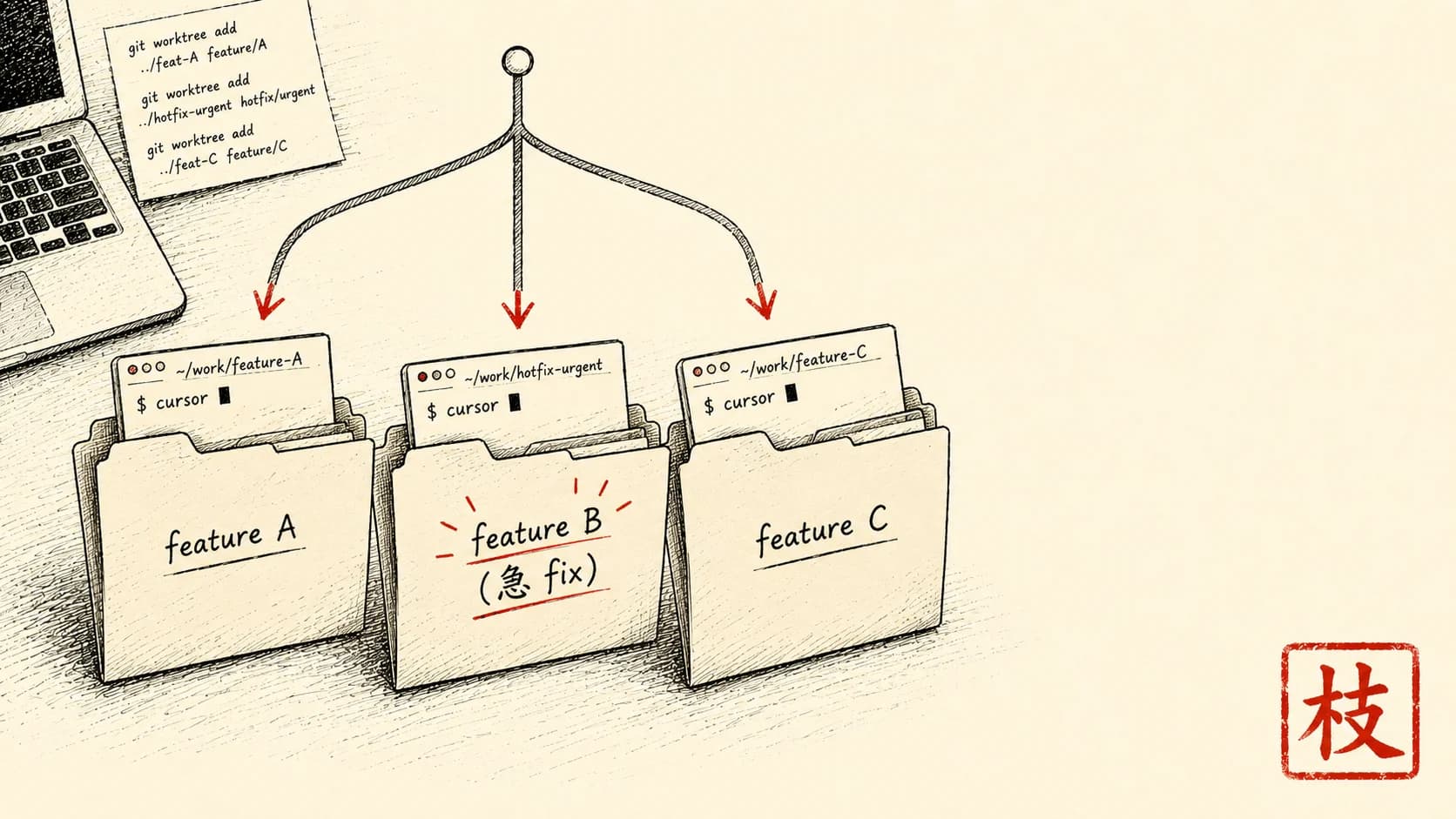
Feature A 做緊一半,老闆嗌「急住搞掂 feature B」——切換情境就蝕咗 20 分鐘。Git worktree 解決:每個 feature 自己一個資料夾 + 自己一個 Claude Code session,可以並行。教你點設定,點同 Claude Code 整合。

難度 ★★★時間 25 分鐘用具 Claude Code 安裝咗、Git 基本識
【編者撰】一個香港人

情境

你中午做緊 feature A:「將用戶搜尋加入 dashboard」。改緊 4 個檔案,做咗三成,成個來龍去脈喺個腦入面已經載齊嗮。

老闆 ping:「急住搞掂 feature B 嘅生產 bug——用戶由 2pm 開始登入唔到」。

冇 worktree 嗰陣嘅做法:

  1. 將未 commit 嘅 A 工作 stash 起:git stash(但 Claude Code session 嘅來龍去脈就冇咗)
  2. 轉 branch:git checkout main && git pull && git checkout -b fix/login-bug
  3. 打開 Claude Code 重新講一次:「我而家修登入 bug,你冇 feature A 嘅背景。當佢冇發生過。」
  4. 修 bug、commit、push、開 PR
  5. 轉返去:git checkout feature-a
  6. 將 stash 攞返出嚟:git stash pop
  7. 又再同 Claude Code 講一次:「接返 feature A。我之前 stash 起咗,而家已經還原。」

每切換一個方向就蝕 20 至 30 分鐘。每日做 2 至 3 次切換 = 純切換時間蝕咗 1 至 1.5 個鐘。

Git worktree 解決:

呢篇拆解 worktree 點設定,同 Claude Code 點整合。

跟住做

1. Worktree 概念

標準 git:1 個 repo = 1 個資料夾,branch 共用資料夾(一次只可以 1 個 active)。

Worktree git:1 個 repo = 主資料夾 + N 個 worktree 資料夾,每個 worktree = 1 個 active branch。

~/projects/my-app/                 ← main repo, branch=main
~/projects/my-app-feature-a/       ← worktree, branch=feature/user-search
~/projects/my-app-fix-login/       ← worktree, branch=fix/login-bug

3 個 folder、3 個 branch 並存。

2. 設定第一個 worktree

去你現有 repo:

cd ~/projects/my-app
git status
# 確認 clean (no uncommitted change)

建立 worktree:

# Format: git worktree add <path> <branch-name>
git worktree add ../my-app-feature-search feature/user-search

呢個指令:

ls ~/projects/

my-app/
my-app-feature-search/

Cd 入新 worktree:

cd ../my-app-feature-search
git status
# On branch feature/user-search

獨立工作目錄、自己嘅 state。

3. 喺 worktree 開 Claude Code

cd ~/projects/my-app-feature-search
claude

Claude Code 將呢個資料夾當成自己一個獨立項目。對話歷史獨立,唔會夾雜到主 repo 嘅嘢。

開始做 feature:

我 implementing user search. 需要 add API endpoint /search?q= + frontend search bar.

Claude 跟住你 feature 嘅設計同實作行,背景獨立。

4. 突發生產 bug——開第二個 worktree

老闆 ping 嚟個緊急 bug。你唔使將 feature 工作 stash 起、唔使轉 branch:

cd ~/projects/my-app
git worktree add ../my-app-fix-login fix/login-bug

cd ../my-app-fix-login
claude

新開一個 Claude Code session,用一套清爽嘅背景嚟修:

急 fix: users can't login since 2pm. Help me investigate.

Claude 第 1 個 session:做 feature,背景冇被污染。 Claude 第 2 個 session:修 bug,全神貫注。

兩個同時行緊。第 1 個視窗:IDE + Claude Code A。第 2 個視窗:IDE + Claude Code B。

5. Fix + ship + 返回

# In fix worktree
git status  # See your fix
git add .
git commit -m "fix: login bug, regenerated session tokens"
git push -u origin fix/login-bug
gh pr create

PR 開咗,修正都出咗去。

返去 feature worktree:

cd ~/projects/my-app-feature-search
# Feature 工作仍然完整, Claude Code session 仲跑緊

你一秒之內就接返手。唔使 stash pop、唔使重新講一次。

6. 合併完 cleanup worktree

PR merged。清理:

cd ~/projects/my-app
git worktree remove ../my-app-fix-login
# Removes folder + cleans worktree registry
git branch -d fix/login-bug

資料夾冇咗,Git 歷史完整(commit merged into main)。

7. 常用 worktree 指令

# 列嗮 worktrees
git worktree list

# Add new worktree
git worktree add <path> <branch>

# Remove worktree (clean exit)
git worktree remove <path>

# Force remove (uncommitted changes)
git worktree remove --force <path>

# Prune (cleanup stale registry entries)
git worktree prune

變化

變化 1:Claude Code 並行 agent + worktree 組合

Claude Code 嘅 Agent 工具配 isolation: "worktree" 參數 —— 喺獨立 worktree spawn subagent:

Agent({
  description: "Refactor auth module",
  isolation: "worktree",
  prompt: "Refactor /src/auth/* for clearer separation of concerns. Run all tests after."
})

效果:Claude 自動開一個 subagent → 建立臨時 worktree → subagent 喺隔離環境做嘢 → 如果改咗嘢,commit 完返返路徑。你睇過 → 接納或者棄掉。

呢個模式就係:「Claude 喺隔離 branch 做實驗」+「OK 就接納入主線」。零風險探索。

變化 2:5+ 並行 worktree 模式

進階用法:5+ worktree 並存。

~/projects/my-app/                  ← main
~/projects/my-app-feature-a/        ← feature A
~/projects/my-app-feature-b/        ← feature B
~/projects/my-app-experiment/       ← experimental
~/projects/my-app-hotfix/           ← hotfixes
~/projects/my-app-docs/             ← documentation rewrite

每個 worktree 自己嘅 Claude Code session、自己嘅任務。你每日:

日尾:可能出 5 個 PR。對比:傳統 1-branch 做法你最多 ship 1-2 個。

⚠️ 心理負擔:成日要記住 5 個 feature。經驗較淺嘅開發者唔啱玩咁多。最舒服嘅位:大部分人 2 至 3 個並行。

變化 3:Worktree + IDE tab 配對

設定 IDE(VS Code)多視窗模式:

用 VS Code「Open Recent」/「Workspace」功能去管理。每個視窗嘅檔案樹只顯示嗰個 worktree 嘅檔案——集中又清晰。

每個視窗一個 Claude Code session。總共:3 個 IDE + 3 個 Claude = 你調度開發嘅能力遠超傳統做法。

拆解:點解 work,同邊度會仆街

跟到上面就已經用得。下面呢段係畀**由「開到三個 worktree 好爽」做到「日日靠佢開發都唔出事」**嘅人——初學者可以跳過,唔影響你跟住做。

Worktree 最呃人嘅地方係:三個資料夾睇落獨立,但底下共用同一個 .git。隔離係假象,真正一齊用嘅嘢一爆就好難捉。實際會喺呢幾個位仆街,你要預咗:

1. 同一個 branch 唔可以 check out 兩次 你想喺第二個 worktree 再開 main 嚟對照?Git 會拒絕:一個 branch 同一時間只可以 check out 喺一個 worktree。

2. 兩個 Claude Code session 改同一個檔案 feature-a 同 fix-login 表面上唔同任務,但隔離嘅只係 working directory——如果兩邊都改到 package.json、common util、或者同一條 migration,merge 嗰陣就撞。

3. 未 commit 嘅嘢 remove 咗就冇得返 做完急 bug 想清場,手痕打 git worktree remove --force——但嗰個 worktree 仲有未 commit 嘅改動。

4. 慳磁碟,但 build artifact 唔慳 共用 .git 慳到 Git 歷史嘅空間,但每個 worktree 嘅 node_modules、build 輸出、.next 之類係各自一份。

5. IDE 同 Claude 撈亂咗邊個 worktree 五個資料夾名似樣(my-app-feature-amy-app-feature-b),夜咗眼花,你會喺 feature-b 個窗度做緊 feature-a 嘅嘢。

呢幾個位,就係「開到三個 worktree 好爽」同「日日靠佢開發都唔出事」之間嘅距離。

一個心態

Worktree 真正睇通嘅一點:切換情境蝕嘅時間唔係「冇得避」——係「慣性做法本身帶嚟嘅摩擦」

傳統 git:一個工作目錄,branch 只係一個視角。換視角 = 心理上要清空 + 重新載入。你個腦冇辦法完美清空——你會花 5 至 10 分鐘重新載返個背景。

Worktree:branch 係一個獨立、實際存在嘅工作空間。換 = cd。個腦唔使清空——feature A 嘅空間仍然完好無缺,等你返嚟。切換成本 → 近乎零。

呢套做法對資深開發者 / 顧問 / 同時跑多個項目嘅 freelancer 嚟講,每日產出會明顯唔同。

最後提醒:

下個大 feature 試吓專屬一個 worktree。一個禮拜後,你切換情境嘅摩擦會明顯降低。一個月後,你會諗返起:點解傳統 branch 切換一直係慣性做法。

文中工具 · 連結

  • 開發者用 — terminal 入面同 Claude pair coding

睇完想同 Claude 一齊行一次?

撳一撳,就將成段 tutor 指示(連埋成篇文嘅內容)抄入剪貼簿。 貼入 Claude.ai 或 Claude Desktop,佢會用廣東話帶你一步一步行, 每步問你填關鍵位,最後畀返一個專為你情況寫嘅 prompt 帶走。

下期預告 · 相關情境
訂閱本副刊

每週日早上,
一道新菜送到你 inbox。

一篇 use case、一個香港情境、一個跟得到嘅做法。 冇 sell course、冇話你「再唔學就會失業」。

訂閱通道執緊緊
newsletter service 仲未接通。想第一時間收到新文章——
直接 email 我哋寫一句「訂閱」就得。

Email 「訂閱」畀我